websitechat.ai
What Is a Website Chatbot? How AI Chatbots Work
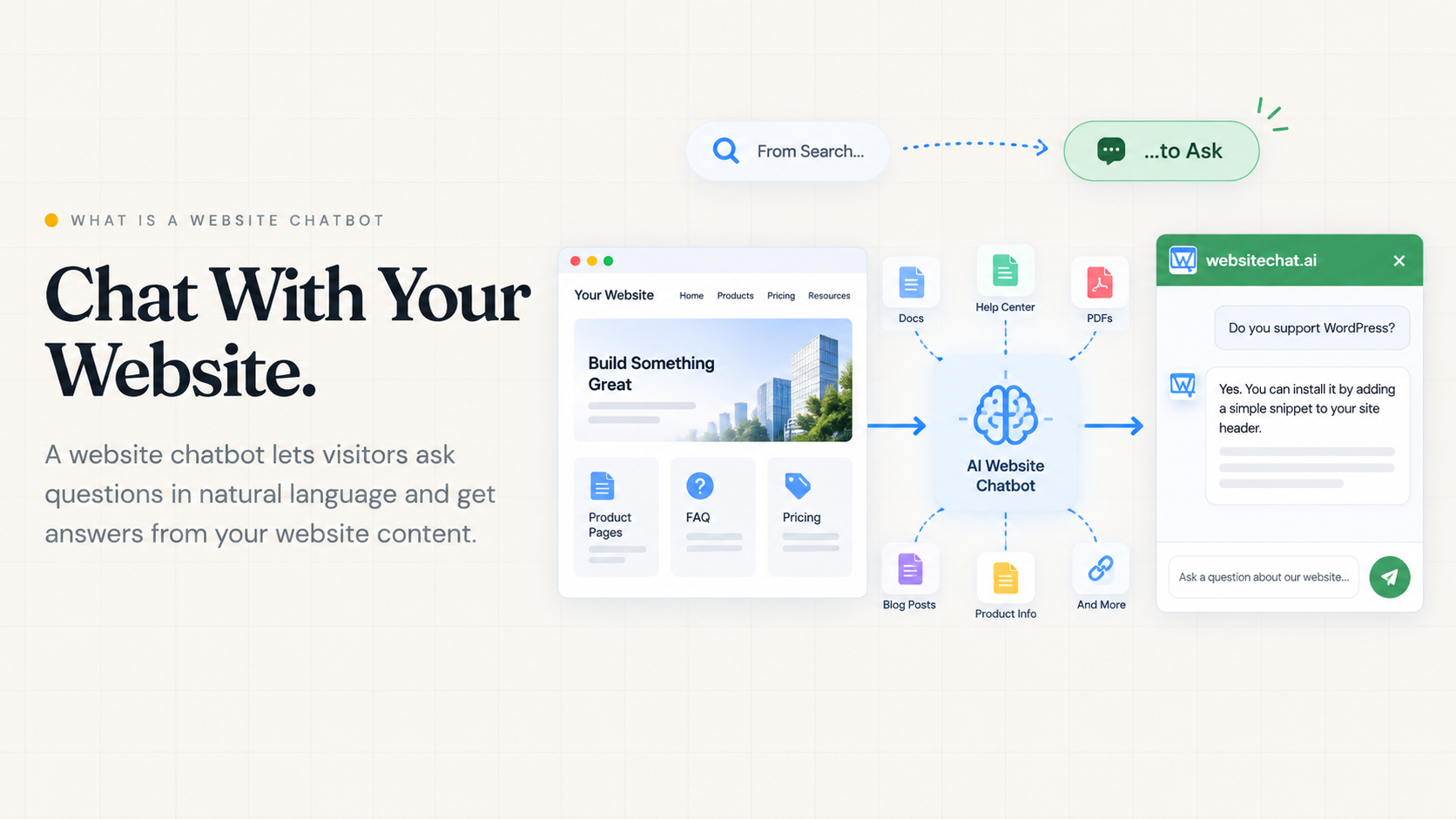
A website chatbot is a conversational interface embedded in a website that lets visitors ask questions in natural language and receive answers or guidance without manually navigating through pages.
Modern AI website chatbots do not invent a second business. They use approved company knowledge: website pages, FAQs, documentation, product and service copy, and—when the product supports it—PDF files.
Traditional websites make visitors search for information. A website chatbot lets visitors ask for it. That shift is the idea behind from search to ask: the site still holds the facts; the chat is how people reach them.
This page explains the meaning of a website chatbot, the main types, how a knowledge-based AI chatbot works, and where it differs from site search, live chat, and a Custom GPT. If you already know the category and want a product, use the WebsiteChat website chatbot page.
Types of website chatbots
“Website chatbot” is a loose label. Four patterns show up on real sites.
Rule-based chatbot
A rule-based bot follows buttons, trees, or scripted flows.
Example:
Pricing → Business → Monthly plan → Contact sales
It is predictable when visitors tap the labels you wrote. It fails when they type a question that is not on the tree, or when two facts live on different branches. Updating it means editing flows, not publishing a clearer page.
Live chat
Live chat is human-to-human messaging on the website. A person reads the thread and types back.
It is not an AI chatbot. Some products mix a bot greeting with a later handoff. The human part still needs staff, hours, and judgment. Use website chatbot vs live chat when you are choosing between those jobs.
AI knowledge-based website chatbot
Visitors type freely. The system finds relevant company knowledge and an LLM writes an answer in the widget.
WebsiteChat is in this category: published pages, plus PDFs on supported plans.
Visitor question
      ↓
Relevant business knowledge
      ↓
AI
      ↓
Answer on the website
The quality of the answer tracks the quality of the source. That is a knowledge problem, not a “smarter model” problem.
AI agent
An AI agent may go beyond answering. It might book an appointment, open a ticket, update a record, or run a workflow in another system.
Not every AI chatbot is an AI agent. Answering from a pricing page and writing into a calendar are different capabilities. Most website chatbots, including WebsiteChat as it exists today, are built to answer from knowledge—not to operate your back office.
How does an AI website chatbot work?
A useful picture is not “trigger → understand → respond → act → learn.” That sequence describes old scripted bots and overstates what a knowledge chatbot does.
A modern knowledge-based flow looks like this:
Website pages + PDFs
        ↓
Useful text is extracted and kept as knowledge
        ↓
Visitor asks a question
        ↓
Relevant passages are retrieved
        ↓
An LLM writes an answer
        ↓
The reply appears in the site chat
In plain English: you publish (or upload) the facts. The product indexes that text. A visitor asks. The system pulls the closest material and phrases a reply. It does not browse the open web for your refund policy, and it does not “learn” a new policy from chat feedback unless you change the source.
You may hear “RAG” for retrieve-then-generate. The term is optional. The practical idea is enough: find the right paragraph, then write from it.
A concrete example
The site has /pricing, /support, and /shipping.
The visitor asks: “Do you ship to Fukuoka and how much does it cost?”
On a traditional site they often do:
Menu → Support → Shipping → Japan → Pricing
With a website chatbot they ask once. If those pages (or a shipping PDF) actually state Fukuoka coverage and a rate, the chat can return that. If the pages only say “contact us for delivery,” the bot has nothing solid to retrieve.
Where does the chatbot get its knowledge?
For a product like WebsiteChat, knowledge is not a hidden model of your company. It is material you choose.
Website crawling usually covers:
- Products and services
- Pricing
- FAQs
- Company information
- Guides
- Policies
- Other public pages that answer what / where / how much
PDF documents (on plans that include them) usually cover:
- Manuals
- Catalogs
- Detailed specifications
- Extra FAQs
- Policies
- Supporting docs that never became web pages
Pages are the public baseline. PDFs fill gaps. How to add, test, and refresh that knowledge is the subject of how to train an AI chatbot on your website content.
Website chatbot vs site search vs live chat vs Custom GPT
| Website chatbot (knowledge AI) | Site search | Live chat | Custom GPT (in ChatGPT) | |
|---|---|---|---|---|
| Natural-language questions | Yes | Limited; mostly keywords | Yes, to a person | Yes |
| Returns a direct answer | Aims to | Returns links or snippets | Yes, from a human | Yes, inside ChatGPT |
| Lives on your website | Yes | Yes | Yes | No; lives in ChatGPT |
| Uses company-specific knowledge | If you connect pages/PDFs | Your indexed pages | Whatever the agent knows | If you uploaded files or linked sources there |
| Requires a human agent | No, for covered questions | No | Yes | No |
| Available 24/7 | Yes, if the widget is live | Yes | Only when staffed | When the visitor is in ChatGPT |
| Helps visitors navigate information | By answering, sometimes pointing to a page | By listing pages | By conversation | Off-site |
| Controlled by the website owner | You control sources and the widget | You control the site index | You staff and script agents | You control a GPT; visitors must find it |
Site search is still right when someone wants a named page: “privacy policy,” “login,” a SKU.
Live chat is right for complaints, exceptions, and anything that needs a person to decide.
A Custom GPT is right when staff or logged-in ChatGPT users should query your files inside ChatGPT. It is not the same as a widget on your public site. That distinction is spelled out on Custom ChatGPT for your website.
A knowledge website chatbot is right when visitors already on your domain should ask in their own words and stay on the page.
What can visitors ask a website chatbot?
Generic promises (“improve support”) hide the real test: can it answer the questions people already send?
SaaS
- “Does the Growth plan support multiple websites?”
- “Can I install this on WordPress?”
- “Do you offer a free trial?”
Those answers usually sit on pricing, docs, and an install page.
Restaurant
- “Are you open on Sunday?”
- “Do you have vegetarian options?”
- “Can I make a reservation?”
Hours and menu belong on the site. Booking may still need a form or a phone number if the bot cannot create a reservation.
Local service / construction
- “Do you work outside Fukuoka?”
- “How long does a typical renovation take?”
- “Do you provide estimates?”
Coverage and timelines must be written down. An estimate request is often a form, not an invented number.
Manufacturer
- “What is the operating temperature of this model?”
- “Can I download the installation manual?”
- “Which model supports 200V?”
Specs often live in PDFs, not on a short product card. That is why crawl plus documents matter; see training a chatbot on website and PDF knowledge.
The same pattern shows up in AI chatbots for customer support: the bot is useful on questions the business has already answered in writing.
What a website chatbot cannot do
Credibility starts here.
It cannot reliably know information you never provided
If no page or PDF states the refund period, do not expect a correct refund period. A good bot says it does not have that fact.
It cannot fix contradictory sources
Pricing page: $49/month. Old PDF: $39/month. Retrieval may surface either. The knowledge is inconsistent. Fix or retire the old file.
AI answers are not guaranteed to be perfect
The model can misread a table, blend two products, or sound sure when the source is thin. Source quality, testing, and recrawling still matter. There is no honest “100% accurate” claim.
It should not replace people in every situation
Leave humans on complex complaints, unusual quotations, contract decisions, and sensitive or high-risk issues.
The principle is the same as in the training guide: good chatbot answers start with good source knowledge.
How to add a chatbot to a website
Keep the install short. The concept is not the setup manual.
- Add the website.
- Crawl the published pages.
- Test questions customers already ask.
- Add missing knowledge (clearer pages or PDFs).
- Configure the widget (name, welcome, position).
- Add the snippet to the site.
The click-by-click path is in the WebsiteChat setup guide, including where the snippet goes on common platforms.
When this page is not the next click
If you came here to evaluate a product—pricing, setup, industries, trial—use AI website chatbot for your website. This article stays on the definition: what the thing is, how knowledge chat works, and what it is not.
Frequently Asked Questions
- What is a website chatbot?
- A website chatbot is a conversational interface on a website. Visitors ask in their own words and get an answer or next step without hunting through menus.
- How does a website chatbot work?
- A knowledge-based chatbot uses approved company material—usually crawled pages and, on some products, PDFs. When someone asks a question, it finds the relevant passages and an LLM writes a reply in the chat widget.
- Is a website chatbot the same as live chat?
- No. Live chat is a person typing. A website chatbot answers from knowledge without waiting for an agent. Some sites offer both. For a fuller comparison, see website chatbot vs live chat.
- What is the difference between a website chatbot and site search?
- Search returns pages to open. A chatbot aims to return the answer itself. Search still helps when someone wants a specific URL. Chat helps when they have a question in everyday language.
- Can a chatbot learn from my website?
- Many AI website chatbots crawl published pages and use that text as knowledge. Drafts and admin screens are usually not included. After you change important pages, the crawl needs to be refreshed.
- Can an AI chatbot use PDF files?
- Some products, including WebsiteChat on supported plans, can add text-based PDFs such as manuals or catalogs. Image-only scans are not a reliable source.
- Does a website chatbot require coding?
- A typical install is a JavaScript snippet on the site, plus connecting the public URL. Application development is not required unless the CMS blocks third-party scripts.
- Can a website chatbot generate leads?
- It can answer fit and pricing questions, then point the visitor to a trial, form, or contact path that already exists on the site. That is different from a CRM or checkout system.
- How accurate are AI website chatbots?
- Answers follow the sources you give them. Missing, vague, or contradictory pages produce weak replies. They are not guaranteed to be perfect. Test real questions and keep sources current.
- Is a website chatbot the same as an AI agent?
- No. A chatbot answers from knowledge. An agent also takes actions in other systems—booking, tickets, updates. Most website chatbots are not full agents.
Add this chat to your website
Start a 14-day trial, or compare plans if you already know what you need.